On Flickr, YouTube and many other sites you get the choice to use "embed code" in order to put any media (picture, video or audio) on Facebook or another website. Here are the steps for using the embed code:
 Go to the site that has the picture or video you want to use. To find the embed code choose SHARE. You will be given a choice to post to various places or get the link to copy and an embed code (on Flickr it was called HTML or BBedit code). Copy the embed code.
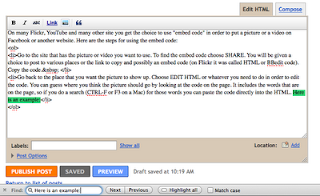
Go back to the page you want the media to be on. To go back to the place that you want the picture to show up, choose EDIT HTML or whatever you need to do in order to edit the code. You can guess where you think the picture should go by looking at the code on the page. It includes the words that are on the page, so if you do a search (CTRL-F or F3 on a Mac) for those words you can paste the code directly into the HTML. Here is an example: (I searched for the words "Here is an Example:)
When I pasted the code into the HTML on my blog this is what actually showed up!
Now you can save, publish or preview to see that the picture or video that you wanted to show is now on your webpage.
The reason to use embed code is that the picture STAYS on the site where it was originally and you just put in a pointer to that place. When someone looks at your page the computer automatically gets the picture or video from the other place and puts it on your page.
Tomorrow we are back to Facebook!
 S
S


